Break the ice on a video call without an icebreaker game
Forty minutes into a call, the energy is gone. Three cameras are off. Someone is clearly reading email. You can feel it from the other side of the share, and the official remedy — “let’s do a quick round of two truths and a lie” — would make it worse.
There is a smaller move available, and it works because nobody sees it coming.
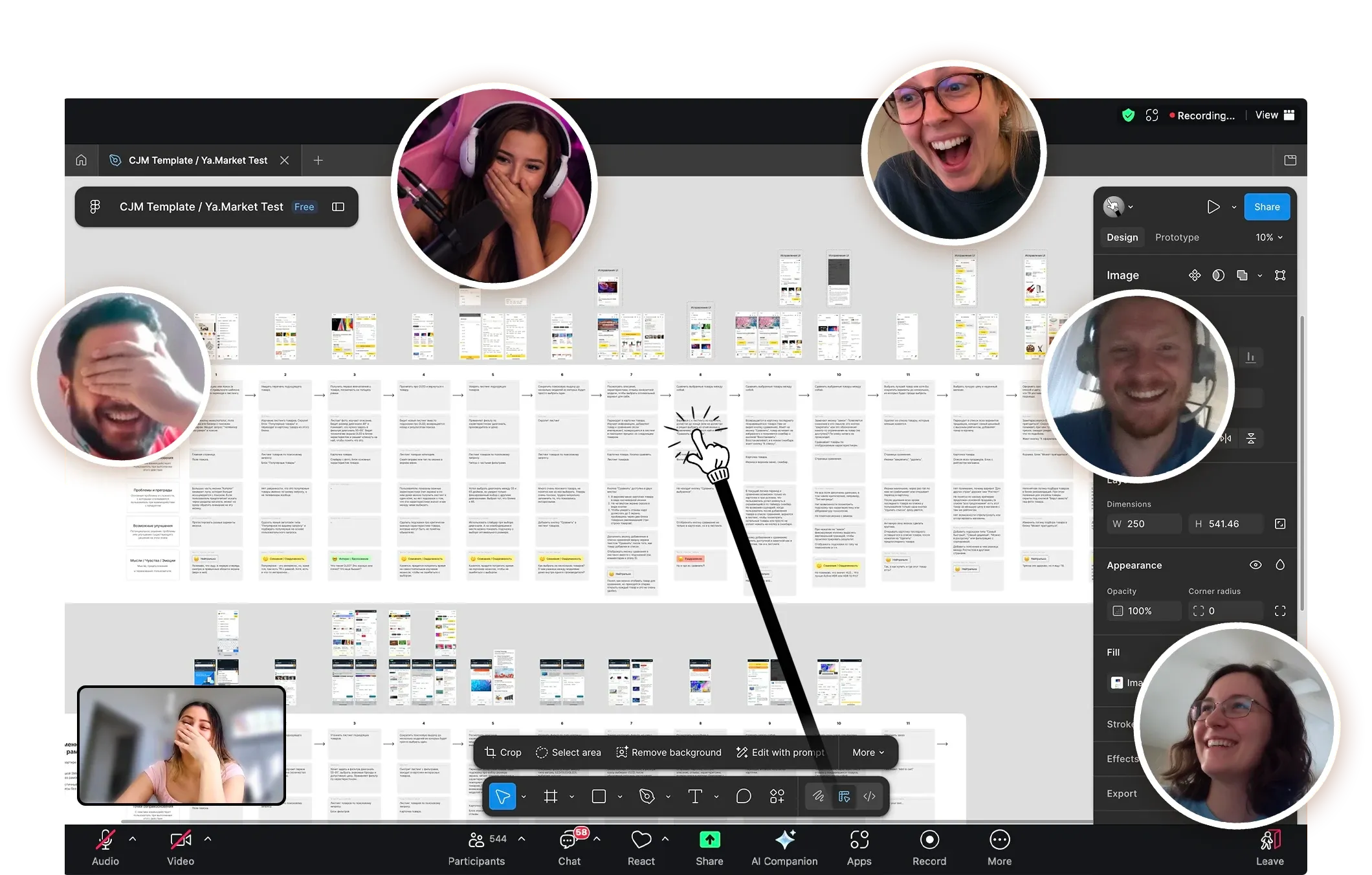
The whole event lasts about ten seconds and nobody had to volunteer for it.
Why do icebreaker games make meetings worse?
Because they are work. A scheduled icebreaker asks everyone to stop, perform something personal on cue, and be judged on it, all while the actual agenda waits. It takes eight minutes, it has a facilitator, and at least two people in the room are dreading their turn before it starts.
What a flat call needs is not a scheduled activity. It needs a jolt that costs nobody anything.
What actually breaks the ice?
Something unexpected, brief, and not aimed at anyone. Three properties, all necessary:
- Unannounced. The surprise is the mechanism. The moment you say “let’s do something fun”, you have made it an activity and lost it.
- Short. Ten seconds, not eight minutes. It should interrupt the flatness, not the meeting.
- No participation required. Nobody has to answer, volunteer, or be funny on demand. They just get to react.
Most team-building advice fails the second and third tests at once.
How does a cursor do that?
You hit ⌃⌥P mid-sentence and keep talking. Your cursor is now a cartoon hand on a telescopic stick, and when you click, it taps the screen. You did not mention it. You do not explain it. You carry on with the slide.
Someone always says something. Usually “wait, what is that”. That question is the whole event: it takes ten seconds, nobody had to perform, and the room is paying attention again. Then you turn it off, or you don’t.
It works because the reaction comes from the audience rather than being requested from them. It is closer to a dog walking into frame than to a facilitated activity.
Where does it land hardest?
On numbers. A call where someone is walking through charts is the flattest format there is — dense slides, small type, a presenter narrating percentages — and it is exactly where a pointer has the most to do anyway.
Two different things happen depending on which way the numbers went.
When the numbers are good, pointing at them with something emphatic adds a charge the slide cannot carry on its own. This is why it shows up in recorded content — webinars, YouTube channels doing stock or crypto breakdowns — where the host has to hold attention through a wall of figures with nothing but their voice. The tap is a beat, and a chart walkthrough with beats in it is a different video than one without.
How do you point at bad numbers without flattening the room?
With a joke, delivered by the pointer rather than by you. Pokey ships a middle-finger pointer, and aiming it at a dip in a chart lands very differently from saying the same thing in words: the miss gets named, out loud, in front of everyone — and the room laughs instead of going quiet.
That is not a cosmetic difference. The hard part of reviewing a bad month is that naming the dip plainly reads as blame, and softening it into “some headwinds there” means nobody registers it happened. Humour is the third option. It lets the number be addressed at full strength while the tone stays survivable, and the team leaves having actually looked at the problem.
Pick the pointer style to match. There are four — tiny hand, cat paw, middle child, and a plain classic arrow for the calls where none of this is appropriate.
Does it work for recorded content as well as live calls?
Yes, and recordings are where it compounds. A live call gets one reaction; a recording gets it from every viewer, every time, for as long as the video is up.
The rule is the same one that governs everything else here: share or record the entire screen, not a single window. macOS captures only that window’s contents when you scope a share to one window, and a system overlay is not part of them.
If you want the taps audible as well as visible, share your system audio too — each tap makes a small knock, and it travels like any other system sound.
When should you not do this?
Worth saying plainly, because the answer is not “always”.
- A first call with a new client. You have no read on the room yet, and recovering from a misjudged joke costs more than a flat meeting does.
- Genuinely bad news. Layoffs, a serious incident, anything where levity reads as not taking it seriously. The middle-finger pointer has a narrow and obvious range.
- Cultures where it will not land. Some teams will love it and some will file it under unprofessional. You already know which one you are in, and the classic arrow exists for exactly this case.
The hotkey is the whole safety mechanism: on when it helps, off a second later, nothing to undo.
Questions people ask
Do other people need to install anything? No. They are watching a video of your screen. Nothing is required at their end.
Can I keep working normally while it is on? Yes. Clicking, dragging and selecting all behave exactly as before — only the look of the cursor changes. There is also a Presentation Mode (⌃⌥T) where clicks tap the pointer without touching what is underneath, for when you want to point at something clickable and not click it.
Will it survive into the Zoom recording? Yes, under the same whole-screen rule as the live call.
Which macOS do I need? macOS 26 or later, 27 included.
More about how it behaves on a live call is on the main page, and the rest of the questions are in the FAQ.